
ADS62P24EVM
1 Overview
This user’s guide gives a general overview of the evaluation module (EVM) and provides a general description of the features and functions to be considered while using this module. This manual is applicable to the ADS62P42/43/44/45/48/49, ADS62P22/23/24/25/28/29 and ADS62C15/17 analog to digital converters (ADC), which will be collectively referred to as ADS62PXX. This document should be used in combination with respective ADC data sheet. The ADS62PXX EVM provides a platform for evaluating the analog-to-digital converter (ADC) under various signal, clock, reference and power supply conditions.
1.1 ADS62PXX EVM Quick-Start Procedure
The ADS62PXXEVM provides numerous options for providing clock, input frequency and power to the ADC under evaluation. The quick start procedure describes how to quickly get initial results using the default configuration of the EVM as it was shipped. The EVM can be put back to default configuration by setting all jumpers to the default positions as described in Table 1. The default configuration of the EVM is for the Input Frequency (IF) and the clock input, each to be a single ended input that is transformer-coupled to the ADC. The default configuration for the power supply is to provide a single 5V supply to the red banana jack J10, PWR IN. The default configuration for the EVM is to control the modes of operation by jumper settings for parallel input control pins rather than serial SPI control of the register space. The other modes of operation of the EVM are described in the latter sections of this document. If users modify the default jumper settings, this procedure does not apply.
A quick-setup procedure for the default configuration of the ADS62PXX follows:
Verify all the jumper settings against the schematic jumper list in Table 1.
Connect the 5V supply between J10 (PWR IN) and J12(GND). If you are using the TSW1200 for capture, it also can be used to source 5V for the EVM. To use the 5V output power of the TSW1200, configure JP8 to short 1-2, J22 to short 1-2, and jumper over 5V from the banana jacks on the TSW1200 to J10 on the ADC EVM. Do not connect a voltage source greater than 5.5V.
Switch on power supplies
Using a function generator with 50W output impedance, generate a 0V offset, 1.5VPP sine-wave clock into J19. The frequency of the clock must be within the specification for the device speed grade.
Use a frequency generator with a 50W output impedance, generate a 0V offset,–1 dBFS-amplitude sine-wave signal into J6 (Channel A) or J3 (Channel B).This provides a transformer-coupled differential input signal to the ADC.
Connect the TSW1200 or suitable logic analyzer to J8 to capture the resulting digital data. If a TSW1200 is being used to capture data, follow the additional alphabetically labeled steps. For more details, see Connecting to FPGA Platforms, located in this document.
a. After installing the TSW1200 software and connecting the TSW1200 to the USB port, open the TSW1200 software.
b. Depending on the ADC under evaluation, select from the TI ADC Selection pull-down menu.
c. Change the ADC Sample rate and ADC Input frequency to match those of the signal generator. d. After selecting a Single Tone FFT test, press the Capture Data button.
2 Circuit Description
2.1 Schematic Diagram
The schematic diagram for the this EVM is attached at the end of this document. See the schematic or relevant section of this user's guide before changing any jumpers.
2.2 ADC Circuit Function
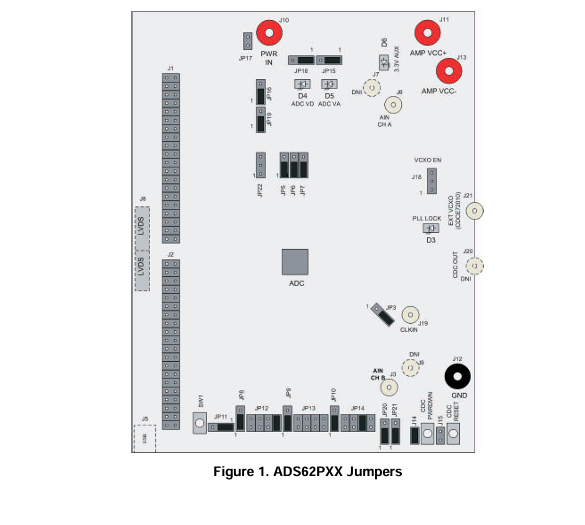
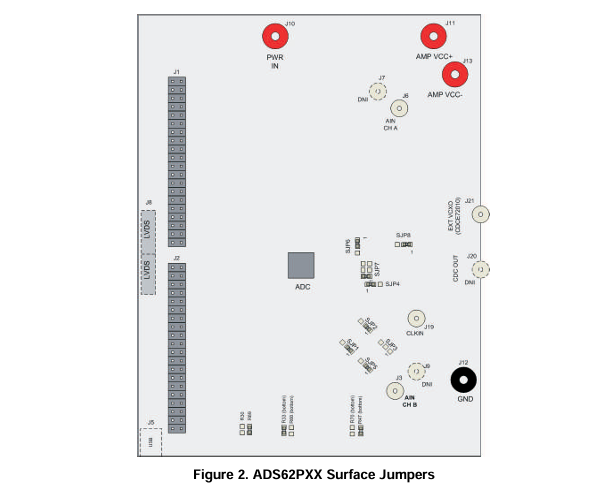
Selection of various modes of operation of the ADS62PXX EVM is most often controlled by jumpers on the EVM, either by placing shunts on 0.025-inch square jumper posts or by installation of surface mount 0W resistors. In general, the use of 0W resistors as jumpers are used in the clock or signal path where signal integrity is critical, and jumper posts are used for static or low-speed control paths. Figure 1 shows the relative location of the jumpers, connectors, and switches used on the ADS62PXX EVM. Figure 2 shows the relative locations of most of the resistors and surface-mount 0W jumper locations used on the EVM. In the description of the circuit options in the following sections, each operational mode is accompanied by a table entry that details the jumper or resistor changes that enable that option. Figure 1 and Figure 2 can assist the user to quickly identify where these jumpers are located on the EVM.
2.2.1 ADC Operational Mode
By default, the ADC is configured to operate in parallel-mode operation, since jumper (JP11) asserts a 3.3V state to the ADC reset pin. Consequently, the SW1 reset pushbutton must be pressed only when the device is configured in serial operation mode. Since the ADC is in parallel operation mode, voltages are used to set the ADC configuration modes. Users can use the information printed on the EVM silkscreen to set the operation modes.
2.2.2 EVM Power Connections
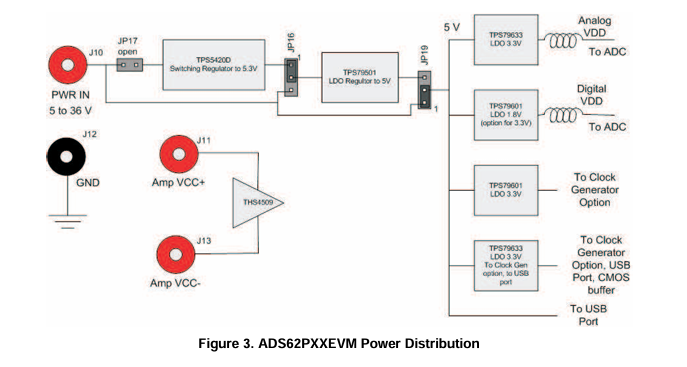
Power is supplied to the EVM through banana jacks. From this input power, several different ways of delivering power to the ADC and other EVM functions are available. Figure 3 shows a simplified representation of the power options available for the ADS62PXXEVM. The default option is to provide 5V to the red banana jack J10, and from there, the EVM generates 3.3V for the analog supply to the ADC and the necessary digital supply voltage for the populated ADC. The EVM also generates the proper voltages for optional features of the EVM such as the Clock Generation circuitry, the USB circuitry, and the CMOS output buffer.
Some ADC devices that may be evaluated on the ADS62PXXEVM platform do not take 1.8V for the digital supply, but rather require 3.3V for the digital supply. For this reason, an adjustable voltage regulator was chosen for the digital supply; the output may be changed to 3.3V by changing the value of a resistor, R269 and capacitor C148. The resistor and capacitor need not to be changed in the field unless the ADC is being changed, because the EVM ships with the correct digital supply voltage for the ADC that is installed. For reference, ADS62P42/43/44/45,ADS62P22/23/24/25 and ADS62C15 use 3.3V as digital supply for the ADC whereas ADS62P48/49,ADS62P28/29 and ADS62C17 use 1.8V as digital supply for the ADC.
Power for the optional THS4509 operational amplifier is supplied by banana jacks J11 and J13. If the amplifier is being evaluated in AC coupled configuration, 5V is supplied to J11, and J13 is connected to ground. In DC-coupled configuration, 4V is supplied to J11 and–1V is supplied to J13. Otherwise, these inputs may be left unconnected.
Although various power options are available on this EVM, care must be taken while applying power on J10 as different options have different voltage ranges specified. Table 2 displays the general jumper setting information; Table 3 displays the various power option settings. Prior to making any jumper settings, see the schematics located at the end of this document.
- 苏州杭晶电子入驻工之芯商城,成为优质供应商
- TPS7A30-49EVM-567_TI(德州仪器)中文资料_英文资料_价格_PDF手册
- TLA2024EVM-PDK_TI(德州仪器)中文资料_英文资料_价格_PDF手册
- INA229_239EVM_TI(德州仪器)中文资料_英文资料_价格_PDF手册
- DAC8832EVM-PDK _TI(德州仪器)中文资料_英文资料_价格_PDF手册
- LP8557IEVM_TI(德州仪器)中文资料_英文资料_价格_PDF手册
- LAUNCHXL-F28027F TI(德州仪器)中文资料_英文资料_价格_PDF手册
- DLPDLCR160CPEVM DLP160CP TI(德州仪器)中文资料_英文资料_价格_PDF手册
- THS4631DDAEVM TI(德州仪器)中文资料_英文资料_价格_PDF手册
- DAC3482EVM TI(德州仪器)中文资料_英文资料_价格_PDF手册
- THS4302EVM TI(德州仪器)中文资料_英文资料_价格_PDF手册
- ADS7038Q1EVM-PDK_TI(德州仪器)中文资料_英文资料_价格_PDF手册
- LM3450AEV230V30/NOPB_TI(德州仪器)中文资料_英文资料_价格_PDF手册
- TPS72728DSEEVM-406_TI(德州仪器)中文资料_英文资料_价格_PDF手册
- WL1835MODCOM8A_TI(德州仪器)中文资料_英文资料_价格_PDF手册
 工商网监
工商网监