
TPS65217DEVM
TPS65217D 评估模块
Thisuser’sguidedescribes thecharacteristics, operation, anduseof theTPS65217evaluationmodule (EVM).TheTPS65217EVMisafullyassembledplatformforevaluatingtheperformanceof theTPS65217 powermanagement integratedcircuit (PMIC).TheTPS65217PMICisused insystemspoweredfroma singlecell (1S) lithium-ion(Li-ion)or lithium-polymer(Li-polymer)wheresizeisaconcern.TheTPS65217 devicehasan integratedbatterychargerandwhiteLED(WLED)boost converter forback-lightingLED strings. Thisdocument includes schematicdiagrams, aprintedcircuit board (PCB) layout, andbill of materials.
1 Introduction
The TPS65217 device is a highly integrated power management solution for portable electronics. Features of the TPS65217 include:
• Power path management for Lithium-ion battery, USB, and AC inputs
• Linear battery charger
• 3DC/DCstep-down (buck) converters
• 2LDOs
• 2load switches (also configurable as LDOs)
• White LED driver capable of driving up to 20 LEDs
2 Requirements
2.1 Software
The EVM will power-up and operate without the use of software (refer to Note in Section 2.3). However, to execute I2C read and write commands to examine status bits or change voltage outputs, the required software (refer to Section 8) must be installed.
2.2 Host Computer
A computer with an available USB port is required to make use of the EVM software. The EVM software runs on the computer and communicates with the EVM through the USB2ANY interface adapter hardware.
2.3 Power Supply
A DC power supply capable of delivering up to 5V and 3A is required to operate this EVM.
2.4 Evaluation Module PCB
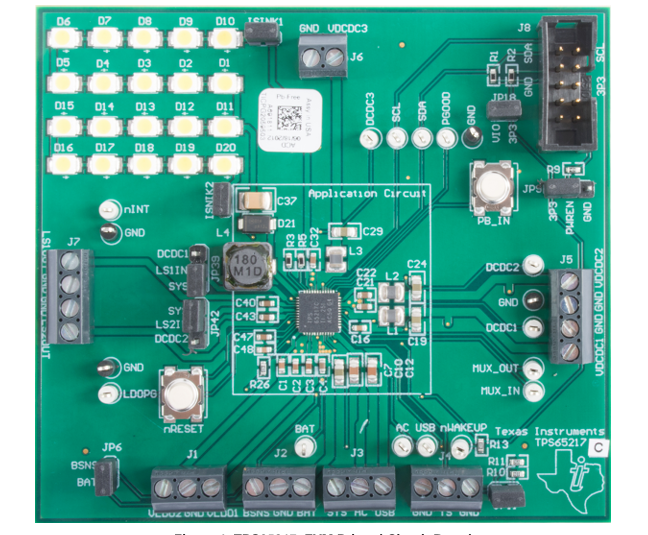
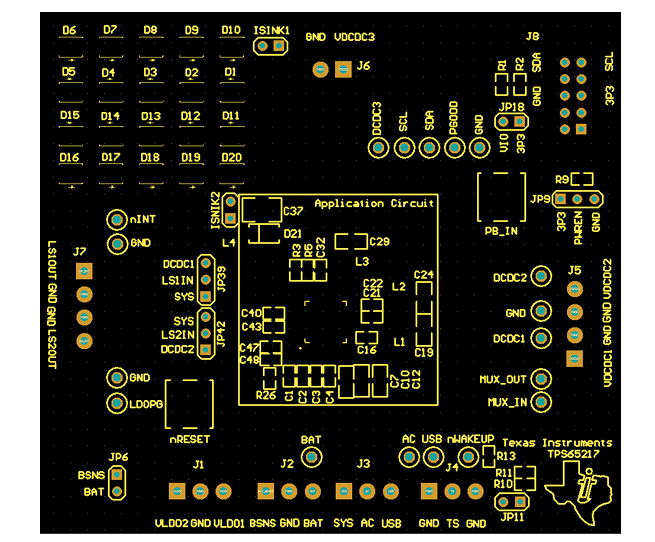
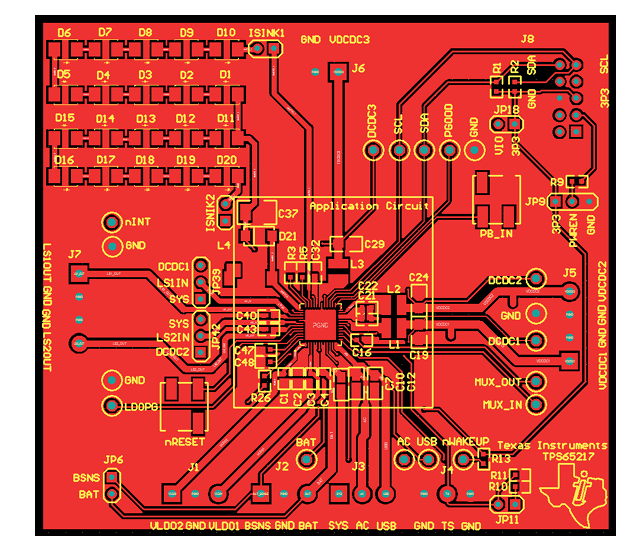
Figure 1 shows the TPS65217CEVM printed circuit board (PCB). The TPS65217AEVM, TPS65217BEVM, and TPS65217DEVM used the same PCB with a different IC revision installed. Unless otherwise noted, TPS65217xEVM refers to all four EVM assembly options.
3 Schematic
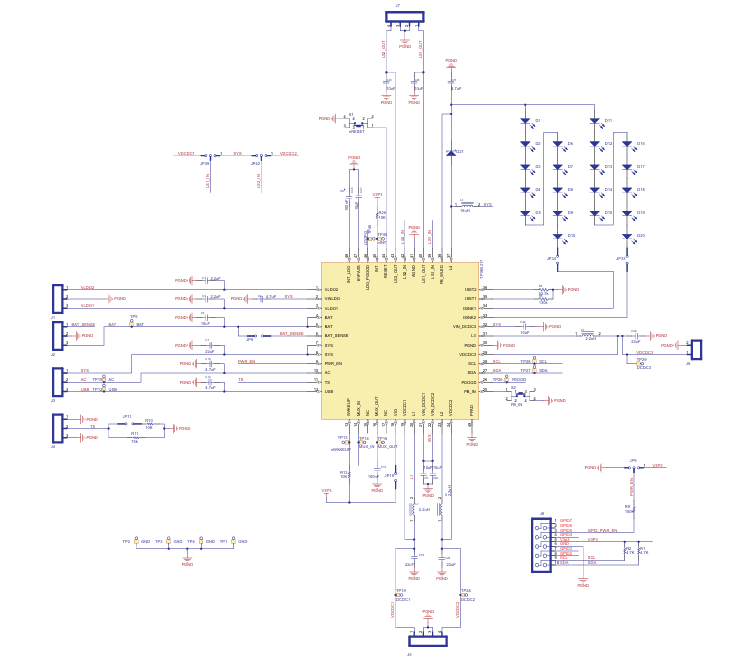
Figure2showstheTPS65217EVMschematic.
4 Setup
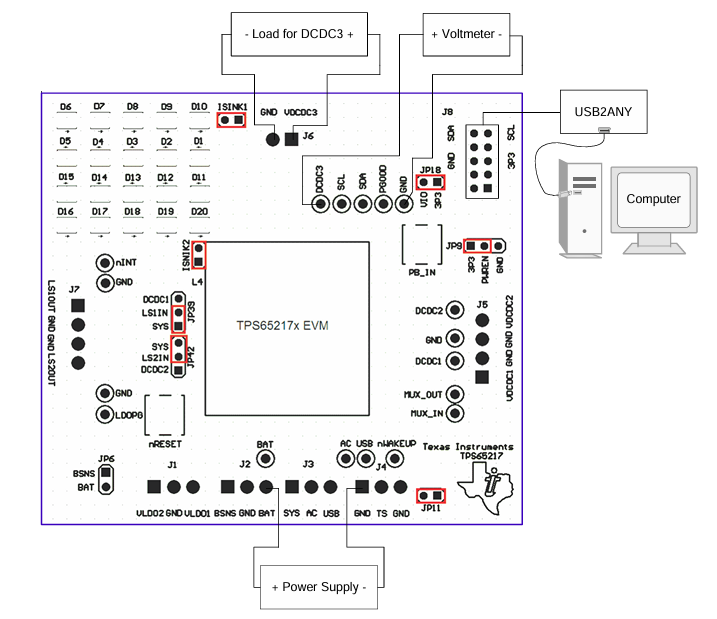
Figure 3 shows an example setup for using TPS65217 EVM.
5 Software
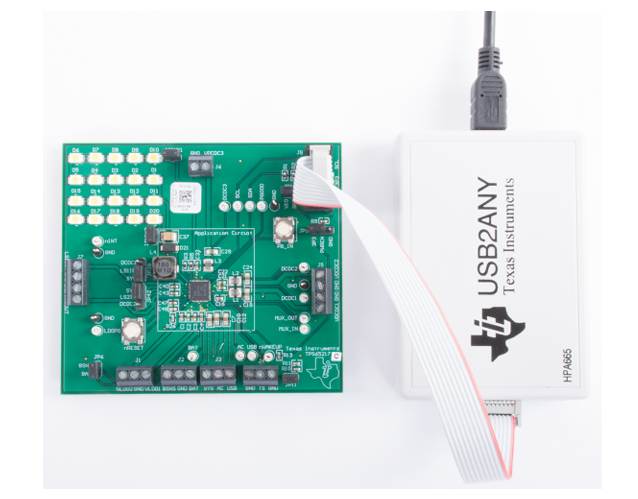
Software support for controlling the TPS65217 over I2C using the USB2ANY adapter can be downloaded from www.ti.com/tool/IPG-UI. To install the software and learn how to use the IPG-UI GUI, follow the instructions in the IPG-UI User’s Guide .
6 Silkscreen Layouts
- 苏州杭晶电子入驻工之芯商城,成为优质供应商
- TPS7A30-49EVM-567_TI(德州仪器)中文资料_英文资料_价格_PDF手册
- TLA2024EVM-PDK_TI(德州仪器)中文资料_英文资料_价格_PDF手册
- INA229_239EVM_TI(德州仪器)中文资料_英文资料_价格_PDF手册
- DAC8832EVM-PDK _TI(德州仪器)中文资料_英文资料_价格_PDF手册
- LP8557IEVM_TI(德州仪器)中文资料_英文资料_价格_PDF手册
- LAUNCHXL-F28027F TI(德州仪器)中文资料_英文资料_价格_PDF手册
- DLPDLCR160CPEVM DLP160CP TI(德州仪器)中文资料_英文资料_价格_PDF手册
- THS4631DDAEVM TI(德州仪器)中文资料_英文资料_价格_PDF手册
- DAC3482EVM TI(德州仪器)中文资料_英文资料_价格_PDF手册
- THS4302EVM TI(德州仪器)中文资料_英文资料_价格_PDF手册
- ADS7038Q1EVM-PDK_TI(德州仪器)中文资料_英文资料_价格_PDF手册
- LM3450AEV230V30/NOPB_TI(德州仪器)中文资料_英文资料_价格_PDF手册
- TPS72728DSEEVM-406_TI(德州仪器)中文资料_英文资料_价格_PDF手册
- WL1835MODCOM8A_TI(德州仪器)中文资料_英文资料_价格_PDF手册
 工商网监
工商网监